
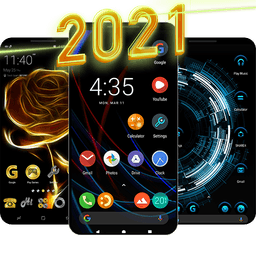
Screenshots
About Launcher for Android ™
Launcher for Android™ is a fast, lightweight home screen replacement that transforms your device with stunning HD wallpapers, sleek themes, and intuitive customization tools — all optimized for Android 14 and beyond.
Take complete control of your home screen appearance. Choose from light, dark, or automatic theme modes that adapt to your preferences. Customize every visual element: adjust icon shapes and sizes, set your preferred grid layout, and apply the latest notification dot styles. With support for icon packs and a handcrafted UI design, you'll find endless ways to make your device truly yours. Lock your home screen to prevent accidental changes, enable home screen rotation for landscape viewing, and access a modern popup menu for seamless app management.
Elevate your mobile experience with an extensive collection of new HD wallpapers designed for 2024. Download high-quality images in just one click and set them as your home screen or lock screen background. Looking for fresh content? Use the same wallpaper library to find the perfect image for your WhatsApp profile picture or other personal needs. Every wallpaper is carefully curated to add style and personality to your device.
Navigate your device faster with intuitive gestures and actions built into the launcher. Swipe up from the home screen to open your app drawer, swipe down with one finger to access notifications, or use a two-finger swipe to reach settings instantly. Double-tap to lock your screen without hunting for buttons, and customize your home button action for quick access to your favorite functions. A bottom search bar with app suggestions and voice search capability makes finding apps effortless.
Manage your apps with ease using advanced organization features. Hide apps from your app drawer to declutter your interface, conceal app names for a minimalist look, or create custom layouts that match your workflow. The lightweight design ensures smooth performance without draining your battery or consuming excessive storage space.
Launcher for Android™ is built for speed and simplicity, giving you a premium home screen experience without compromise. Download today and discover why thousands of users have made this their go-to launcher.
Pros & Cons
Pros
- Extensive HD wallpaper library with one-click downloads and curation
- Customizable gestures and shortcuts for faster app and settings access
- Light, dark, and automatic theme modes adapt to your preferences
- Advanced app organization including hiding and name concealment options
Cons
- Replaces your entire home screen, requiring full migration of layout and shortcuts
- Requires launcher and notification permissions to fully function
- Home screen lock feature can prevent intentional updates to your layout
- Customization complexity may require trial-and-error to find your preferred setup
Related Apps

AlienGUIse
Desktop themes and manager for Windows — transform your system with 5 futuristic designs.

SharpKeys
Remap keyboard keys to launch apps, media controls, and custom commands on Windows.

RocketDock
Desktop launcher for Windows — quick access dock with customizable icons and positioning.

Custom Resolution Utility (CRU)
Display resolution utility: Create custom resolutions for your monitor with precise refresh rate control.

Lagguy Wallpapers
Lagguy
4K & HD wallpapers for Android — minimal, abstract, nature, AMOLED designs with lifetime access

Lock Screen OS
Apps Genz
Customize your lock screen with widgets, photos, and notifications. Replace Android's default lock screen.
Latest Articles

Best Lola alternatives in 2026 (we tested 7)
Jul 12, 2026
Best Primark alternatives in 2026 for affordable UK fashion (7 picks)
Jul 12, 2026

Best RingGo alternatives in 2026 (we tested 7)
Jul 12, 2026

7 best Anki alternatives for desktop in 2026 (we tested every one)
Jul 11, 2026

7 best AppFlowy alternatives for desktop in 2026 (self-hosted included)
Jul 11, 2026